Thursday, 10 January 2019

OIM - How to Clone OOTB Disconnected SOA Composite?

Login to OIM linux machine and go to below location:

$MW_HOME/Oracle_IDM1/server/workflows/composites


Download DisconnectedProvisioning.zip to your local machine.


Unzip it.


Open JDeveloper and Create new Application.


Provide Application Name.


Leave same project name and click on Finish.


Import OOTB Disconnected Composite as "SOA Archive into SOA Project". 

Follow below steps:

Select newly created Application.


Go to File and click on Import.


Select "SOA Archive Into SOA Project".


Provide Project Name. 


Browse and select OOTB Disconnected SOA Composite.


Change Composite Name "DisconnectedProvisioning" to some other name.


Click on Finish.


Delete "Project1" which was created with Application.


Open "Composite.xml".


Go to source.


Search for below tag and change serviceName from "DefaultManualProvADFService" to some other name and save it.

<binding.adf registryName="registryName" serviceName="DefaultManualProvADFService" />


Open "ManualProvisioningTask.task" and go to source.


Search for below tag and change "ManualProvisioningTask" to some other name and save it.

<taskDefinition targetNamespace="http://xmlns.oracle.com/DefaultProvisioningComposite/DisconnectedProvisioning/ManualProvisioningTask


We have done all configuration changes, now we can deploy newly created composite on server. 

Follow below steps for deployment:

Right click on Project and then click on deploy.


Select "Deploy to SAR"


Click Next.


Click Finish.


Jar will be created on location : <APPLICATION_NAME>/<PROJECT_NAME>/Deploy folder.


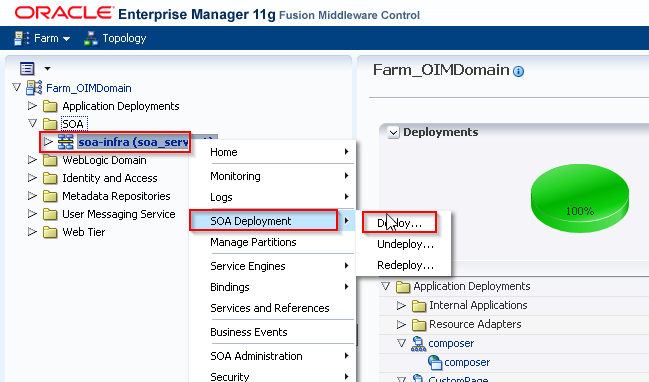
Login to EM Console(http://<HOST_NAME>:7001/em) with weblogic credential. 


Select composite jar.


Select Partition "default" and then click Next.


Click Deploy.


New Disconnected Composite is deployed successfully, now we can use it in process task.


Change Composite Name in Adapter Mapping for all below highlighted Process Task.


Happy Learning!!!

Sunday, 17 June 2018

OIM UI Branding - How to Change Logo on Identity Self Service Console?


Copy a new image file to the deployment directory:-

Copy the "CompanyLogo.png" file to the "$MW_HOME/Oracle_IDM1/server/apps/oim.ear/iam-consoles-faces.war/images/" folder.

Modify the Identity Self Service Console using the Web Composer:-

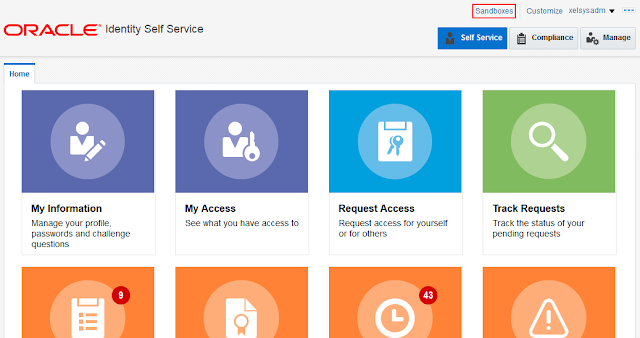
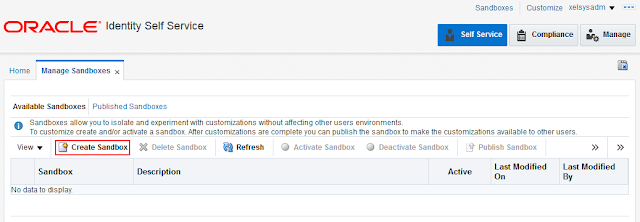
Login to Identity Self Service console using "xelsysadm" credential and create a new sandbox and activate it.


Click on customize on top right corner of the Identity console.


Click on Structure tab.


Change the "Short Desc" field from "Oracle" to <COMPANY_NAME>.

Click on highlighted drop down.

Click on "Expression Builder".

Remove old value i.e #{attrs.logoShortDesc} and put new value.


Click on "OK".


This changes the tool tip text that is displayed when the cursor is moved over the image.


Now change the company logo.

Click on highlighted drop down.


Click on "Expression Builder".


Remove old value i.e #{attrs.logoImagePath } and enter new value as http://<HOSTNAME>:<PORT>/oim/images/companylogo.png


Click on "OK".


Close this window.


Publish the sandbox.


Note: By default, the Oracle logo is 119x25 pixels (Width X height). Therefore, you can use a custom logo of the same dimensions. If you want a bigger logo, then it requires CSS changes.

Happy Learning!!!

OIM API - How to Get OIM Database Connection through the OIM Client?

public void getDatabaseConnectionExample(){
    //get OIM Client
    OIMClient oimClient = getOIMConnection();
   
    //OIM Schema Database Client
    com.thortech.xl.dataaccess.tcDataProvider dbProvider = null;
   
    try{
        //Establish connection to OIM Schema
        XLClientSecurityAssociation.setClientHandle(oimClient);
        dbProvider = new com.thortech.xl.client.dataobj.tcDataBaseClient();

        String query = "select usr_login from usr";           
        com.thortech.xl.dataaccess.tcDataSet usersDataSet = new com.thortech.xl.dataaccess.tcDataSet();
        usersDataSet.setQuery(dbProvider, query);
        usersDataSet.executeQuery();

        int numRecords = usersDataSet.getTotalRowCount();
       
        //iterate through each record
        for(int i = 0; i < numRecords; i++){
            usersDataSet.goToRow(i);
            System.out.println("User Login :: " + usersDataSet.getString("USR_LOGIN"));
        }
    }
  
    catch(Exception e){
        System.out.println("Exception occured while getting user details" + e);
    }
    finally{
        if(dbProvider != null){
            try{
                dbProvider.close();
            } catch(Exception e) {
                System.out.println("Exception occured while closing connection" + e);
            }
        }
       
        XLClientSecurityAssociation.clearThreadLoginSession();  
    }
}


Happy Learning!!!

OIM API - How to Get OIM Database Connection in Plugins?

public void getDatabaseConnectionExample() {
    Connection connection = null;
    try {
        connection = Platform.getOperationalDS().getConnection();

        String sql = "select usr_login from usr";
        PreparedStatement preparedStatement = null;

        preparedStatement = connection.prepareStatement(sql);
        ResultSet rs = preparedStatement.executeQuery();
        while(rs.next()){
            System.out.println("User Login :: " + rs.getString(1));
        }
    } catch (Exception e) {
        System.out.println("Exception occured while reading user details " + e);
    } finally {
        try {
            connection.close();
        } catch (Exception e) {
            System.out.println("Exception while closing connection : " + e);
        }
    }
}


Happy Learning!!!

OIM API - How to Remove Assigned Proxy from User?

To execute below code you have to add following jars in classpath:

  • commons-logging.jar

  • eclipselink.jar

  • jrf-api.jar

  • oimclient.jar

  • spring.jar

  • wlfullclient.jar


Stand Alone Code:


import java.util.HashSet;
import java.util.Hashtable;
import javax.security.auth.login.LoginException;
import oracle.iam.identity.usermgmt.api.UserManager;
import oracle.iam.identity.usermgmt.api.UserManagerConstants;
import oracle.iam.identity.usermgmt.vo.User;
import oracle.iam.platform.OIMClient;

public class ProxyOps {
    OIMClient oimClient = null;
    UserManager userManager = null;
   
    //identity self service details
    String username = "xelsysadm";
    String password = "<password>"; //xelsysadm password
    String t3url = "t3://<hostname>:<port>"; //OIM HostName and Port
    String authwl_location = "<location of authwl.conf file in your local machine>"; //eg. D:\\authwl.conf
      
    public void getOIMConnection(){
        System.out.println("getOIMConnection() : Start");
        //set system properties
        System.setProperty("java.security.auth.login.config", authwl_location);
        System.setProperty("OIM.AppServerType", "wls");
        System.setProperty("APPSERVER_TYPE", "wls");

        Hashtable oimenv = new Hashtable();
        oimenv.put(OIMClient.JAVA_NAMING_FACTORY_INITIAL, "weblogic.jndi.WLInitialContextFactory");
        oimenv.put(OIMClient.JAVA_NAMING_PROVIDER_URL,t3url);
        oimClient = new OIMClient(oimenv);
        try {
            oimClient.login(username, password.toCharArray());
            System.out.println("Connected");
        } catch (LoginException e) {
            e.printStackTrace();
        }
        System.out.println("getOIMConnection() : End");
    }
   
    public void removeUserProxy(String userLogin, String proxyUserLogin) {
        System.out.println("removeUserProxy() : Start");
       
        //get user manager service
        userManager = oimClient.getService(UserManager.class);
       
        try {
            //get proxy user key from user login
            String proxyUserKey = getUserKeyByUserLogin(proxyUserLogin);
           
            System.out.println("UserLogin :: " + userLogin + " " + "ProxyUserKey :: " + proxyUserKey);

            userManager.removeProxy(userLogin, proxyUserKey, true);
        }catch(Exception e) {
            e.printStackTrace();
        }
        System.out.println("removeUserProxy() : End");
    }

    public String getUserKeyByUserLogin(String userLogin){
        HashSet<String> attrsToFetch = new HashSet<String>();
        attrsToFetch.add(UserManagerConstants.AttributeName.USER_KEY.getId());
   
        try{    
            User user = userManager.getDetails(userLogin, attrsToFetch, true);
            return user.getEntityId();
        }catch(Exception e){
            System.out.println("Exception occured while fetching user key");
            return null;
        }
    }
   
    public static void main(String[] args) {
        try {
            ProxyOps obj = new ProxyOps();
            obj.getOIMConnection();
           
            String userLogin = "TestUser1";
            String proxyUserLogin = "ProxyUser1";
           
            obj.removeUserProxy(userLogin, proxyUserLogin);
           
        } catch (Exception e) {
            System.out.println(e.getMessage());
        }
    }
}


Happy Learning!!! 

Saturday, 16 June 2018

OIM - SQL Query to Get Members of Admin Role.

select usr.usr_login
from admin_role_membership,admin_role,usr
where admin_role_membership.user_id = usr.usr_key
and admin_role_membership.role_id = admin_role.role_id
and admin_role.role_name = 'OrclOIMSystemAdministrator';


OIM API - How to Get Members of Admin Role?

public void getAdminRoleMembers(String adminRolename) {
    String logp = CN + "getAdminRoleMembers";
    logger.info(logp + "START");
    Connection connection = null;
    ResultSet rs = null;
    try {
        connection = Platform.getOperationalDS().getConnection();

        String sql = "select usr.usr_login from admin_role_membership,admin_role,usr where admin_role_membership.user_id = usr.usr_key and admin_role_membership.role_id = admin_role.role_id and admin_role.role_name = ?";


        PreparedStatement preparedStatement = null;
        preparedStatement = connection.prepareStatement(sql);
        preparedStatement.setString(1, adminRolename);
        rs = preparedStatement.executeQuery();
        logger.info(logp + "Members count :: " + rs.getFetchSize());
       
        while(rs.next()){
            logger.info(logp + "User Login :: " + rs.getString(1));
        }
    } catch (Exception e) {
        logger.error(logp + " Exception while getting members of admin role " + e);
    } finally {
        try {
            rs.close();
            connection.close();
        } catch (Exception e) {
            logger.error(logp + " Exception while closing connection : " + e);
        }
    }
    logger.info(logp+ "END");
}


Happy Learning!!!